Real patterns. Sewn onto your character.
Pick your character, pick a garment, press Simulate. Seamline sews drafted sewing patterns onto the body and runs the cloth on your NVIDIA card. Layers stay in order, hems stay clean, and every result has a control you can change.
Windows 64-bit · Blender 5.2+ · NVIDIA RTX 20 series or newer, driver 580+
Plus a free one-time download from NVIDIA (Warp, 135 MB): one button in the add-on
TS-01 T-shirt, size 12, all four pieces at the same scale. This is the pattern Seamline sews when you click Basic T-shirt.


Frames from walk takes, dressed and simulated in Seamline with the fabrics each garment comes with, and rendered in Cycles. No retouching.
Twenty-four flat pieces, sewn
The varsity jacket is 24 pattern pieces, each cut flat and sewn at its seams on the body. The same take three ways, playing in step.
Three steps, top to bottom
The panel is three boxes in order. A step stays greyed until the one before it is done, so you always know what comes next. Everything else waits under More.
Character
Pick your rig from the list or click it in the viewport. Seamline finds the bones, the body and the boots by itself, and says in one line whether the character is ready.
Clothes
Pick a ready-made outfit, or click garments in the grid, choose Tight, Regular or Loose, and press Dress. Garments go on inner to outer by type: trousers, then a tee over them, then the jacket. An outfit takes about a minute, and one Ctrl+Z takes it off again.
Simulate
Choose a style and press Simulate. When the take finishes, Seamline checks it and either says "Looks good" or tells you in a sentence what may show, where and on which frame, with a button that goes there.

Before your first take: one download from NVIDIA
Seamline runs its cloth on NVIDIA Warp, NVIDIA's free simulation library. Warp is not inside the add-on zip, so the first time you open Seamline a red line in the panel says it needs its simulation runtime. Press Install runtime and it downloads Warp 1.19 from PyPI for you: 135 MB, about 330 MB on disk. You do this once.
You need an internet connection that one time and an NVIDIA driver 580 or newer. No internet on that PC? Download the file on another computer and use Install from file.
One preset, three bodies
The same varsity outfit on a woman, a man and a big man. Seamline measures each body when you press Dress and fits the pattern to it. No open seams on any of the three.
Drag a ring to fit
Every dressed garment gets a ring at each sleeve end, leg end and hem. Pull a ring along the arm or leg to change the length, pull it away to change the width. While you drag, the part shows how it will change, with the millimetres beside the ring. Let go and Seamline refits the garment to the new measurements, in 25 to 40 seconds on an RTX 3090 Ti.
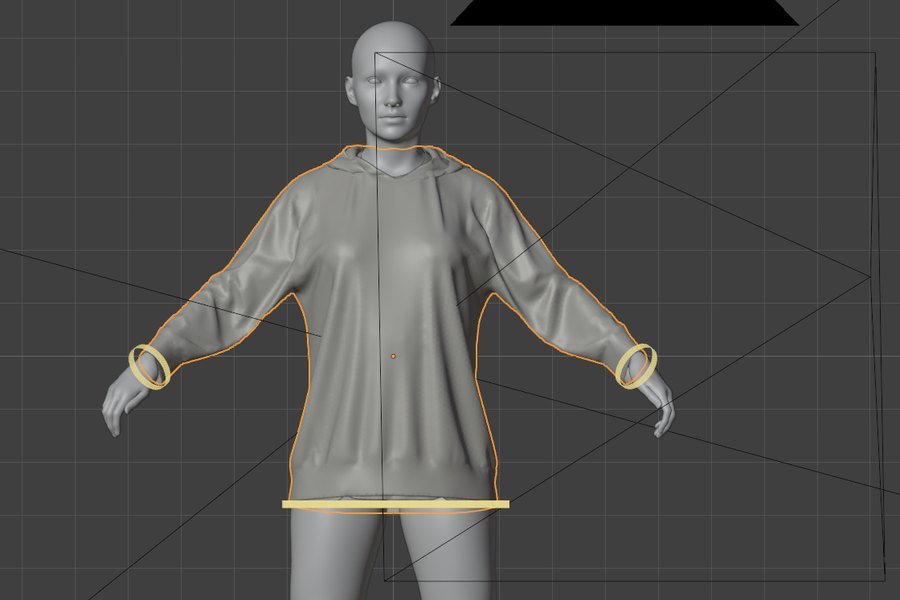

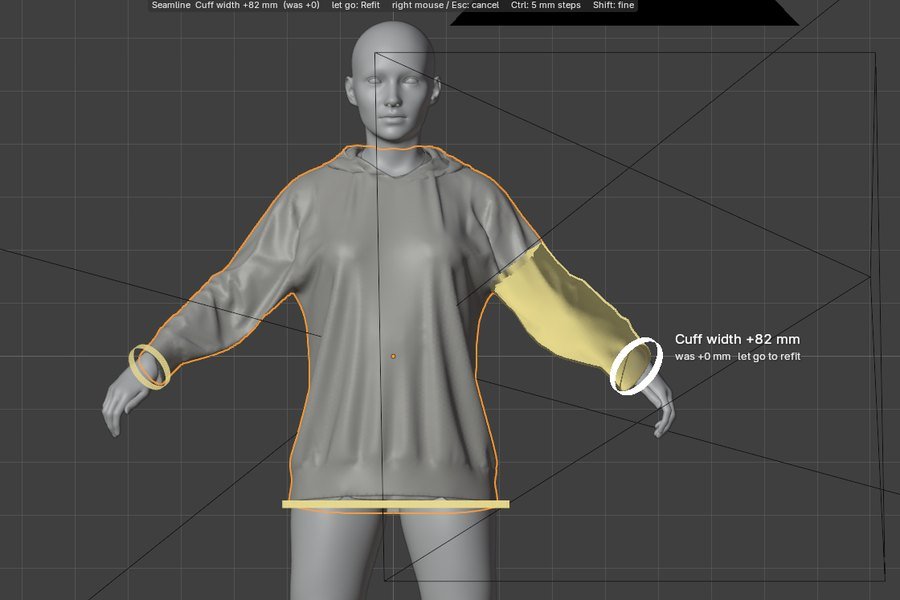
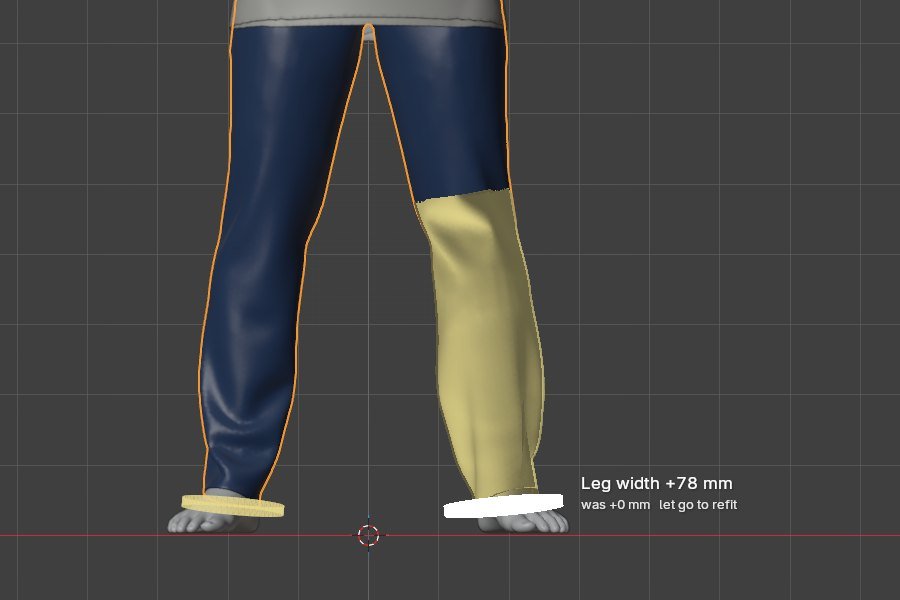
Screenshots of Seamline in Blender 5.2.
Clean cloth on the first take
The bar is cloth that looks real to the eye. The fixes that make a take usable run by themselves, and each one has a plain switch if you want it off.
Led by the body
The cloth follows the body first and adds its own swing on top, so a walk cycle doesn't turn into flapping.
Measured fabrics
Weight, stretch and bend come from measured cloth, from 20 g/m² chiffon to 407 g/m² rigid denim.
Clean-up built in
Every frame, cloth is pushed out of the skin, layers stay in order, trouser hems tuck into boots and sharp creases are eased.
Clean hems
Hems that ride up on the thighs or twist are eased back to a clean line. One slider, from the raw simulation to a pressed, level hem.
Hide what's covered
One button hides the skin and the inner layers nobody can see, so they can't poke through. Keep at edges sets how much stays near collars, cuffs and hems.
Smooth at render
Thickness and smoothing are added as modifiers, so the viewport stays quick and the render stays soft.
Close-ups from the same walk takes, rendered in Cycles. No retouching.
Five seconds of walk, under a minute
120 frames on the same meshes, the same body and the same walk as Blender's Cloth modifier. Seamline's time runs from pressing Simulate to a finished take.
T-shirt7,983 points
Trousers, T-shirt and varsity jacket29,324 points
The outfit race above, rendered: the same 120 frames, body and lights, playing in step.
Each mark on a tape is one minute. One PC: RTX 3090 Ti for Seamline, 64-core Threadripper 3990X for Blender 5.2.0, which runs its Cloth on the processor. Your times will vary. Seamline's time includes reading the animation and 24 lead-in frames; Blender's is its 120 frames only.
Blender Cloth was set up by hand for clothing: self-collision on, 3 to 4 mm spacing, each garment colliding with the body and with what is under it. Medians of three runs; Blender's outfit times are one run. Blender's new experimental cloth took 23 s and 22 s, without self-collision or layers.
A style, four sliders, a brush
Start from a style, then set four sliders per garment. The brush beside the first three paints them onto parts of the garment: hold the collar, let the hem swing.
Natural: the look Seamline ships with. The body leads the cloth and small wrinkles are half calmed.
One slider on one garment. When the body leads a loose poncho it pulls in between the legs; at 0 it hangs like cloth.
Fifteen measured fabrics
Each fabric carries measured weight, stretch and bend from published sources. Pick one per garment, or leave the garment in the fabric it was drafted for.
Not just walks
Seamline simulates whatever your rig does. The same presets on a jog, a jab and cross, a two-foot jump, a twirl, a shoulder stretch and a football kick.
Jog, punch, stretch and kick: Mixamo. Jump and twirl: motion capture from CMU Graphics Lab Motion Capture Database. Renders are ours, in Cycles.
Bring in a pattern from CLO
Import pattern reads a garment exported from CLO 3D or Marvelous Designer as real pattern pieces, then dresses it on your character like any preset.
Shown with the Open+Pattern M59 field shirt (CC BY 4.0, credit "Open+Pattern").
Forty-six garments, eight outfits
Each one is a drafted pattern with seams, grain lines and a fabric. Seamline measures your character at Dress time and fits the pattern to it. An outfit puts a whole look on in one pick.
Tops
- Basic T-shirtCotton jersey
- V-neck teeCotton jersey
- Fitted teeStretch jersey
- Cropped teeCotton jersey
- Oversized teeCotton jersey
- Boxy teeStretch jersey
- Tank topCotton jersey
- Crewneck sweatshirtFrench terry
- Quarter-zip fleeceFrench terry
- HoodieFrench terry
- Football shirtStretch jersey
- Hockey jerseyStretch jersey
- Basketball jerseyCotton jersey
Outerwear
- Bomber jacketNylon ripstop
- Long bomberNylon ripstop
- Varsity jacketWool suiting
- Track jacketStretch jersey
- WindbreakerNylon ripstop
- Half-zip anorakNylon ripstop
- Bomber giletNylon ripstop
Trousers and shorts
- Plain trousersChino twill
- Slim jeansStretch denim
- Straight trousersChino twill
- Tapered trousersWool suiting
- Wide-leg trousersWool suiting
- Palazzo trousersLinen
- Cargo trousersChino twill
- Carpenter trousersChino twill
- Baggy jeansStretch denim
- Parachute pantsNylon ripstop
- Open-hem sweatpantsFrench terry
- Tapered joggersFrench terry
- Track pantsStretch jersey
- Chino shortsChino twill
- Denim shortsStretch denim
- JortsStretch denim
- Cargo shortsChino twill
- Running shortsNylon ripstop
- Basketball shortsCotton jersey
Dresses, skirts, poncho
- Shift dressStretch jersey
- A-line dressStretch jersey
- Hoodie dressFrench terry
- Midi skirtCrepe
- Circle skirt, midiCotton jersey
- Flared skirt, maxiCotton jersey
- PonchoWool suiting
Ready-made outfits
- Bomber, tee and cargos
- Varsity jacket, tee and straight trousers
- Hoodie, tee and slim jeans
- Track jacket, tee and joggers
- Windbreaker, tee and chino shorts
- Anorak, sweatshirt and running shorts
- Poncho, tee and straight trousers
- Sweatshirt and baggy jeans
Seamline Pro
Everything Seamline does, in one edition: $49 at launch, then $69.
- Three-step panel: character, clothes, simulate
- 46 garments and 8 outfits, with Tight, Regular and Loose fit
- Fit rings in the viewport: drag to change sleeve, leg and body length, cuff and leg width
- 15 measured fabrics
- Automatic clean-up: push-out, layers, tuck into boots, crease easing, Clean hems, Hide what's covered
- Calm, Natural and Lively styles; Follow body and Wrinkles for the whole garment
- Preview quality, and the check after every take
- Final quality
- Hold shape, and painting each look slider onto parts of a garment
- Fix stage and layer priority
- Import pattern: garments from CLO 3D or Marvelous Designer
Windows 64-bit, Blender 5.2 or newer, an NVIDIA RTX 20 series card or newer with driver 580+, and a free one-time download from NVIDIA (Warp, 135 MB) that the add-on installs with one button.
What comes next
The plan after 1.0, in order. There are no dates, and what Pro owners ask for can change the order.
Dress a character in three steps
- 46 garments and 8 ready-made outfits
- 15 measured fabrics, Tight, Regular and Loose fit
- Import pattern from CLO 3D or Marvelous Designer
- A check after every take, in plain words
Fixes and fit
- Whatever buyers report first
- Layers: a hoodie under a jacket, a top under a gilet
- Jackets worn open
- Tops tucked in
Make it yours
- Mix and match: choose the sleeve, neck, hem and length, and Seamline drafts it
- Rolled sleeves and cuffs, a crop line
- One-click variations for background people
- Save a garment to your own library
Direct it
- Wind, with a drag arrow and gusts
- Pins: a hand in a pocket, a held collar, a bag strap
- Reshape one hero frame and blend it into the motion
- Re-simulate a frame range and keep several takes
Wardrobe two
- Shirts: Oxford, short sleeve, overshirt
- More skirts and dresses
- Real pressed pleats
- Linings and two-piece collars
Design
- Draw on the garment: a new neckline, a crop, a seam
- A pattern editor, and DXF (AAMA) pattern import
- A Studio edition for farms, the command line and Alembic
Not planned
Mac and AMD graphics cards: the simulation runs on NVIDIA only. More physics sliders: every new feature is one button or one switch.
Before you buy
- What do I need?
- Windows 64-bit, Blender 5.2 or newer, and an NVIDIA card from the RTX 20 series on, with driver 580 or newer. The add-on is a 2 MB zip. Press Install runtime once and it downloads NVIDIA's Warp library from PyPI: a 135 MB download, about 330 MB on disk. You can also install that file by hand.
- What doesn't it do yet?
- Tops are worn untucked and jackets closed. A hoodie under a jacket can cross at the collar, and a layer under a gilet at the armholes. There are no pressed pleats, and you can't draw your own patterns in 1.0.
- AMD, Intel or Mac?
- Not in 1.0. The simulation runs on NVIDIA cards only. A CPU switch exists for checking a file, but it is too slow for real shots.
- Two graphics cards?
- Seamline uses the one that isn't drawing your screen, so Blender stays responsive while it simulates. With one card it uses that card and tells you Blender may feel slower during a take. You can pick a card in Preferences.
- My own character?
- Yes. Pick any rig in the scene. Seamline finds the bones and the body by itself and tells you in plain words if something is missing.
- Did it install properly?
- Seamline checks your computer a few seconds after you switch it on: Blender version, graphics card, driver and its own library. If anything fails, a red line in the panel says what to do.
- Something went wrong?
- This is version 1, so there may be a few bugs to polish out. Preferences can save a crash report with everything we need to look into it, and fixes come first in 1.1.