Blender add-on · Camera · 4.2 and up
Place. Path. Time. Move a waypoint on the tenth revision and the timing holds.
Anyone gets a move down quickly.
The work is in the tenth revision.
How you use it
Three moves. No keyframe stack to fight.
Frame the view, drop a waypoint, repeat. Pie menu E in Object Mode. Two is enough to start.
The curve builds itself as you place. Nudge a waypoint and it reflows, arc-length, so distance still reads right.
Linger, ease, ramp. Drag the grips on the Timeline until the move lands.
Timing
The path is arc-length, so a ramp maps to distance travelled — not raw frames.
| View | What you are looking at |
|---|---|
| The ramp drawn on the path in the viewport, segment by segment | |
| The same ramp in the finished shot, pacing and all |
Timing grips
Linger, ease and ramp from the Timeline or Dope Sheet.
Pass-through waypoints
Keep the motion flowing where you don't want a hard ease stop.
Per-segment ease
Override intensity and bias when one beat needs its own feel.
Speed colour
Fast and slow read straight off the path overlay.
Crawl Zone
Hold the camera in slow motion through a waypoint, then let it run again.
Auto Smooth
Retimes the path from its own shape. No preset to pick.
Move a waypoint.
Your timing holds.
Revisions
A pacing note shouldn't cost you the keyframes you already sold.
In the viewport
Most of what you reach for is a keypress away, not a trip to the panel.
Pie menu on E
Place Waypoint, Build Path and Save as Shot, one key away in Object Mode.
Time ticks
Read the pacing off the path itself.
Frustums
See what each waypoint is framing.
Polish
All on the path. All plain keyframes when you want them back.
Focal length animated along the move, so the zoom is part of the travel rather than a second pass.
Where it lands
Keyframes on the camera data. Edit them by hand any time.
Target a subject and the camera finds it early, holds it through the pass, then lets go.
Where it lands
A target you can move. Look-at lines draw in the viewport.
The horizon leans into a turn and levels out after, scaled to how hard the corner is.
Where it lands
Roll on the camera, on top of the path. Dial it to zero and it's gone.
Handheld weight stacked on a move you already like, with strength meters so you can see what you're adding.
Where it lands
A layer over the bake. Mute it, re-time it, or bake it down.
What it's for
What's in it
Waypoints
Frame the view, drop a point. The path builds as you go.
Arc-length path
Respects distance between points, and reshapes in the viewport.
Timing grips
Linger, ease and ramp from the Timeline or Dope Sheet.
Speed graph
Shape each segment on a viewport overlay, not a panel.
Lens on the path
Focal length animated along the move.
Look-at
Target a subject with look-ahead, so the camera finds it early.
Auto-bank
The horizon leans into a turn and levels out after.
Shake layers
Handheld weight on top of a move you already like.
Shot listNew in v1.3
Save, mute, colour-code and duplicate setups in one file.
Guided recoveryNew
Edit the curve by hand and keep the timing you built.
Pie menu
E in Object Mode for what you reach for most.
Plain Blender out
Standard objects and keyframes. Uninstall the add-on and the shot still renders.
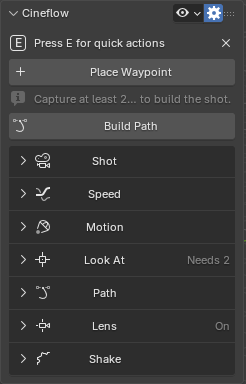
Where it lives
| Host | Blender 4.2 and newer — extension install. Tested through 5.0.1 and 5.2 |
| Panel | 3D Viewport → N-panel → Cineflow. Pie menu E in Object Mode |
| Use | Camera paths — blocking, retiming and polish |
| Version | 1.3.0 |
| Updates | Included for owners |
| License | GPL-3.0-or-later, commercial use included |
| Dependencies | None — Blender only |
| Author | oculis.studio |
Output
Standard Blender objects and keyframes. The Graph Editor is always there.
Not for flown moves
After the wobble and punch of a real FPV drone rather than a composed move? Cine Drone will serve you better.
Version history
Three free updates since launch. Owners got all of them.
The shot list.
Save, mute, colour-code and duplicate setups in one file. Guided curve recovery, shake strength meters and modal status hints landed with it.
Auto Smooth.
Retimes the path from its own shape. No preset to pick.
Crawl Zone.
Hold the camera in slow motion through a waypoint, then let it run again.
First release.
Waypoint paths, the arc-length curve, timing grips, lens, look-at and shake.
Coming next
The shot list, guided recovery and shake meters all landed on top of the v1.0 core at no extra cost. Next on the bench:
Focus along the path
Pull focus in the same waypoint language — focus distance and depth of field as the camera travels.
Import camera animation
Turn an existing animated camera into a Cineflow path. Sample the move, get editable waypoints, retime.
Commercial
Sell the work you make with it.
GPL-3.0
Or later.
Buy now, get these when they ship
No subscription, and no upgrade fee for owners.
Questions
Yes. Cineflow outputs standard Blender objects and animation, so the Graph Editor is there any time. Edit the path curve by hand and guided recovery lets you keep the edit and re-time, or discard and rebuild.
Cineflow
Waypoints, a reshapeable path, timing you can feel.